


















How to use LinkedIn targeting in Microsoft Advertising

LinkedIn targeting in Microsoft Advertising exists to help brands message-map their best creative with the ideal audience.
When approached thoughtfully, it allows you to apply professional understanding to intent‑driven inventory without breaking the bank.
The key is knowing how the targeting methods work together across the various campaign types.
What follows is a practical guide to using LinkedIn data inside Microsoft Advertising, including:
- LinkedIn in Search campaigns (includes Multimedia ads).
- Using LinkedIn insights to inform broader audience strategy.
- Performance Max targeting signals.
- Directional insights into audience reach and composition through Audience Planner.
Disclosure: I am a Microsoft employee. I attempted to keep this article as objective as possible, focusing on how LinkedIn targeting works as well as action items for targeting, reporting, and creative message mapping.
LinkedIn profile targeting in search
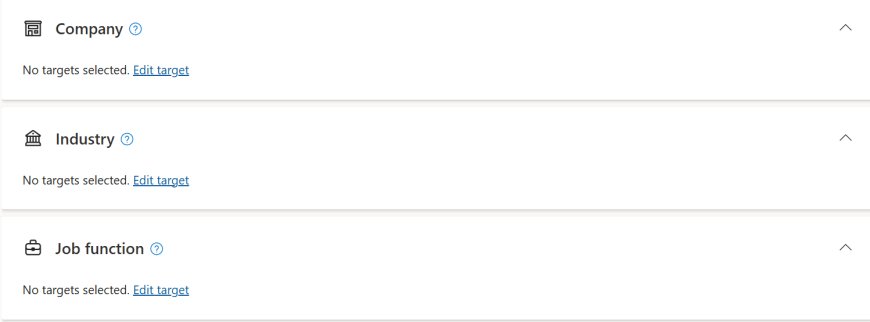
LinkedIn profile targeting is fully available in Microsoft Advertising search campaigns and lets you layer professional attributes on top of keyword targeting.
The supported attributes are:
- Company.
- Industry.
- Job function.
These audiences apply across Microsoft‑owned environments such as Bing Search, Microsoft Edge, Microsoft Start, and other eligible search surfaces, as long as users are signed in.
In search, LinkedIn targeting works best as a contextual guide, not a standalone target.
The keywords still do the heavy lifting. LinkedIn data helps you respond differently when professional relevance is present.

How to approach it
- Start with keywords that already convert: LinkedIn targeting can help amplify existing intent on proven keywords. Apply bid adjustments to campaigns/ad groups where search terms already demonstrate business value. This might mean a 10%-15% increase if you’re bidding aggressively, or a more aggressive bid adjustment if your impression share lost to rank is high.
- Choose one professional dimension first: Begin with either company, industry, or job function – not all three. If you’re targeting someone who works for a company in an industry you’re also targeting, it’s very easy to bid on them twice.
- Use bid‑only mode to establish a baseline: Observation gives you performance clarity before you make delivery decisions. Treat this as audience research on who is engaging with you in a profitable way.
Dig deeper: LinkedIn Ads retargeting: How to reach prospects at every funnel stage
LinkedIn Professional Demographics in Audience ads
Audience ads support LinkedIn Professional Demographics as both a targeting and observation layer – bringing professional context into native, display, and video formats designed for scalable reach.
While Audience ads are not driven by keyword intent, Professional Demographics provide a way to anchor delivery and insights in a real‑world business context, bridging the gap between broad reach and professional relevance.
Audience ads allow you to apply company, industry, and job function as professional audience layers.
These can be used either to observe performance trends or to influence delivery, depending on campaign objectives.

Unlike search, where intent is explicit, Audience ads rely more heavily on audience signals and creative relevance.
LinkedIn Professional Demographics help ensure that reach is oriented toward users who are more likely to be operating in a business mindset, even when browsing content.
How to approach it
- Start in observation to understand natural performance: Use Professional Demographics in observation mode to learn which industries, job functions, or company types naturally engage with your Audience ads before applying delivery constraints.
- Let LinkedIn data inform creative, not just delivery: Because Audience ads appear in feed‑based and content‑rich environments, creative matters more than targeting alone. Use insights from high‑performing professional segments to inform tone, examples, and value framing in messaging.
- Align format choice with professional mindset: Different formats serve different roles:
- Native and display perform well for awareness and education within professional segments
- Video supports storytelling and category framing, particularly when aligned with industry‑specific narratives
- Professional Demographic insights help guide which formats are most appropriate for different business audiences.
LinkedIn data in Performance Max: Guiding automation with purpose
LinkedIn profile targeting is available inside Performance Max campaigns, where it functions as an audience signal.
Within Performance Max, these signals help the system understand which professional profiles have a high probability for profit to your business and help influence how budget is allocated across inventory.
Professional signals are most effective in Performance Max when they are representative and directional, not exhaustive.
They work best when they give the system a strong starting point rather than a narrow definition of success.

How to approach it
- Select signals that reflect your best customers, not every customer: Use LinkedIn attributes that describe your most valuable segments, not the full universe of potential buyers. This is especially important if the different personas represent different ROAS/CPA goals, as all asset groups in a PMax campaign will share the same ROAS/CPA bidding.
- Pair LinkedIn signals with strong conversion definitions: Automation performs better when professional context is reinforced by clear success metrics. It’s critical to ensure there are at least 30 conversions in a 30-day period for any autobidding.
- Allow time for learning: Audience signals need sufficient volume to influence delivery. Avoid frequent changes in the first learning period (two weeks). Once you clear this, budget changes of up to 15% can be made without triggering learning period fluctuation.
Dig deeper: Google and Microsoft: How their Performance Max approaches align and diverge
Reporting: Turning audience data into decisions
Aggregated reporting for LinkedIn audiences is broken down by company, industry, and job function, allowing you to see how different professional segments contribute to performance across campaigns.
LinkedIn reporting can be found in Reporting > Professional demographics, and includes any LinkedIn targeting or audiences applied through predictive targeting.

How to approach it
- Look for consistency across time, not single spikes: Patterns that repeat across weeks or months are more actionable than short‑term anomalies. Give “observation” audiences the time to prove themselves out. If you don’t have time for that, lean on Audience Planner to help you make informed decisions at scale.
- Use reporting to inform creative and bids together: When a professional segment outperforms, examine both messaging and bidding before making changes. It’s possible that the audience really resonated with the creative, but you also want to confirm you didn’t overbid on a particular group.
- Avoid over‑segmentation early: Too many audience cuts can dilute signal strength (especially if you’re running up against conversion scarcity).
Bidding with LinkedIn audiences
In Microsoft Advertising, you can use bid adjustments alongside automated bidding strategies, giving flexibility in how LinkedIn audiences influence auctions.
Because users can belong to multiple professional dimensions, bid adjustments may compound when audiences overlap within auctions, making overlap awareness an important part of bid strategy.
Bidding adjustments are most effective when they are incremental and reversible. The goal is calibration, not acceleration.
How to approach it
- Keep initial bid adjustments small: Single‑digit percentage changes preserve learning while still allowing differentiation.
- Audit audience overlap before increasing bids: Review how company, industry, and job function audiences intersect within campaigns.
- Apply bid changes gradually and sequentially: Adjust one audience dimension at a time to understand its individual impact.
- Reassess after enough volume accumulates: Make decisions only after performance reaches statistical relevance.
Dig deeper: The future of remarketing? Microsoft bets on impressions, not clicks
Creative strategy: Professional relevance without narrow assumptions
LinkedIn targeting shapes who is more likely to see your ads. Creative determines whether those impressions turn into engagement.
Professional cohorts include a wide range of experiences, identities, and perspectives. Effective creative respects that diversity while remaining relevant to the shared context.
Creative works best when it reflects professional empathy – acknowledging challenges, goals, and constraints without relying on shortcuts or stereotypes.
How to approach it
- Anchor creative in shared problems, not titles: Focus on challenges that span roles and seniority levels within a LinkedIn targeting segment.
- Keep language inclusive and adaptable: Avoid assumptions about background, experience, or decision‑making authority.
- Use AI tools to localize, not homogenize: Adapt tone or examples by region or industry while preserving message intent.
- Test creative alongside audience layers: Evaluate messaging performance within LinkedIn segments to refine both together.
Extending LinkedIn insights across B2B campaigns
LinkedIn targeting in Microsoft Advertising presents an opportunity to combine professional expertise with intent-driven media in a way that is scalable, privacy-conscious, and economically sustainable.
For teams already running LinkedIn Ads, it also provides a practical way to extend learnings into additional inventory through automation, supporting reach and efficiency beyond search.
The value doesn’t come from complexity. It comes from alignment – between data, mechanics, and human behavior.
Key takeaways:
- LinkedIn profile targeting is fully available across Search and Performance Max on Microsoft‑owned surfaces.
- Professional attributes function as targeting layers in search and as optimization signals in Performance Max.
- Observation‑first approaches build understanding before commitment.
- Aggregated reporting supports informed optimization without exposing individual data.
- Small, intentional bid adjustments preserve performance stability.
- Creative grounded in empathy strengthens professional relevance.
When LinkedIn data is used with curiosity and care, it becomes a way to see audiences more clearly rather than control them more tightly.
For B2B advertisers navigating complex buying journeys, that clarity is often the most valuable optimization of all.
Dig deeper: 5 LinkedIn Ads mistakes that could be hurting your campaigns
What's Your Reaction?
 Like
0
Like
0
 Dislike
0
Dislike
0
 Love
0
Love
0
 Funny
0
Funny
0
 Angry
0
Angry
0
 Sad
0
Sad
0
 Wow
0
Wow
0